Master Lettering Grids with This Photoshop Brush Pack
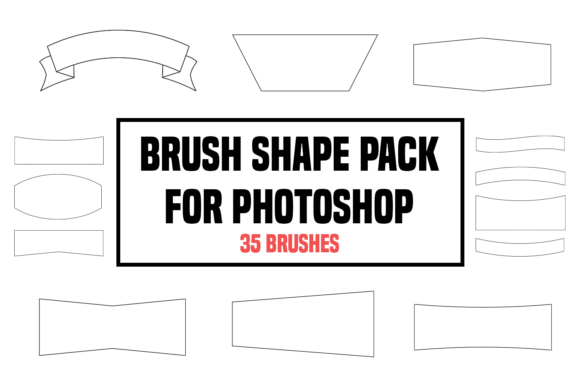
There is a specific kind of friction that happens in the middle of a design project when your tools do not match your vision. You have a clear idea for a hand-lettered logo or a custom typography poster, but the execution gets bogged down by the tedious mechanics of setting up guidelines. Every designer knows the struggle of manually drawing perspective lines, adjusting opacity, and trying to maintain consistent spacing while attempting to capture a fluid, organic feel. This is where a specialized Brush Shape Pack for Photoshop transitions from being a simple download to an essential workflow utility. By integrating a curated collection of 35 brushes designed specifically for structure and form, you can bypass the setup phase and move immediately into the creative work that actually matters.
The core value of this Amazing brush pack for Photoshop lies in its ability to automate the architectural side of lettering. When you are crafting custom type, consistency is king. Whether you are working on a baseline grid, an x-height guide, or complex perspective vanishing points, having instant access to pre-configured brush tips saves significant time. Instead of spending twenty minutes configuring line weights and dash patterns for a grid, you select the appropriate brush from the pack and begin drawing. This shift allows you to maintain your mental momentum. Creativity is often fragile; interrupting the flow to fiddle with tool settings can cause the initial spark of an idea to dim. With these tools ready at hand, the gap between concept and draft shrinks considerably.
Streamlining the Foundation of Custom Typography
For professionals and freelancers who regularly deliver branding assets or editorial illustrations, efficiency directly impacts profitability. The Brush Shape Pack for Photoshop addresses a common bottleneck: the creation of underlying structures for lettering projects. These 35 brushes are not merely decorative stamps; they are functional instruments designed to help you create grids for lettering projects with precision. Consider a scenario where a client requests a vintage-style badge with arched text. Traditionally, you would need to construct a circular path, calculate degrees for each letter, and draw manual guides to ensure the baseline curves correctly. With this pack, you can deploy radial grid brushes that instantly provide the necessary framework, allowing you to focus entirely on the shape and weight of the characters.
The utility extends beyond just straight lines and circles. A robust set of brushes includes variations for different stages of the sketching process. Some brushes in the pack may offer softer edges for initial thumbnailing, while others provide crisp, high-contrast lines for final structural guides. This versatility means you can stay within a single software environment without switching between vector tools and raster sketches. For educators teaching typography or digital illustration, having a standardized set of grid brushes ensures that students are learning on a level playing field, focusing on form rather than struggling with technical setup. It simplifies the decision-making process regarding which tool to use, letting the instructor and student concentrate on pedagogy and practice.
Enhancing Precision Without Sacrificing Organic Feel
One of the misconceptions about using grid brushes is that they make work look rigid or mechanical. However, the opposite is often true. When the underlying geometry is handled efficiently by a reliable Amazing brush pack for Photoshop, the artist has more cognitive bandwidth to introduce organic imperfections that give hand-lettering its character. You are not fighting the grid; you are using it as a safety net. This is particularly valuable for marketers and small business owners who manage their own visual content. They may not have the years of muscle memory that a dedicated typographer possesses, so having strong structural support helps them achieve professional-looking results that feel balanced and intentional.
The pack's inclusion of 35 distinct options suggests a depth of utility that covers various styles. You might find brushes tailored for monoline scripts, others for bold block letters, and specific shapes for creating dynamic backgrounds or texture overlays that complement the lettering. This variety supports a wider range of creative goals. For instance, a blogger creating custom headers for articles can use these brushes to establish a unique visual identity that stands out from standard web fonts. The ability to quickly generate a custom grid means every header can be uniquely structured while maintaining brand consistency across the site.
Practical Applications for Diverse Creators
The audience for this toolset is broad because the need for structured creativity is universal among visual communicators. Publishers designing book covers often require intricate typographic layouts where text interacts with imagery in complex ways. A reliable grid system allows them to map out these interactions accurately before committing to final renders. Similarly, entrepreneurs developing packaging designs can use these brushes to visualize how text will wrap around a three-dimensional object. The Brush Shape Pack for Photoshop serves as a bridge between the flat canvas and the physical product, helping users anticipate spatial challenges early in the design process.
Hobbyists and casual creators also benefit significantly. Often, the barrier to entry for high-quality digital art is the perceived complexity of the tools. By providing an instant download of ready-to-use assets, the learning curve is flattened. A user can install the pack and immediately start experimenting with letterforms that they previously thought were too difficult to execute. This empowerment encourages experimentation and skill development. Instead of watching tutorials on how to build a perspective grid from scratch, the learner can focus on understanding how letters fit into that perspective.
Making the Most of Your Design Workflow
To truly leverage the potential of these 35 brushes, it is helpful to integrate them into a layered workflow. Start with a low-opacity layer using the broader grid brushes to establish the overall composition. As you refine the letter shapes, switch to finer detail brushes for specific alignment checks. This methodical approach ensures that the final piece is both aesthetically pleasing and structurally sound. It is important to remember, however, that while these brushes are powerful aids, they are not a substitute for understanding fundamental design principles. They should be viewed as accelerators for your existing knowledge, not replacements for it.
There are limitations to consider. If your primary work involves purely vector-based outputs for large-scale printing, you may still need to trace over your raster sketches. However, even in a vector-heavy workflow, starting with a robust raster grid created by this pack can speed up the initial drafting phase immensely. Additionally, users should compare the specific brush dynamics with their version of Photoshop to ensure compatibility, though most modern versions handle standard brush files seamlessly. The goal is to find the right fit for your specific pipeline.
Ultimately, the value of this Amazing brush pack for Photoshop is measured in the hours it returns to you. Time saved on setup is time reinvested in refinement, client communication, or exploring new creative directions. For anyone looking to elevate their lettering game, reduce repetitive tasks, and achieve cleaner, more professional results, incorporating a dedicated shape pack is a logical step. It transforms the daunting task of building a layout from scratch into a streamlined process, allowing your unique voice as a creator to take center stage. By removing the friction of technical setup, you free yourself to do what you do best: create compelling visual stories.