Master Hand Lettering with Baoya for Procreate
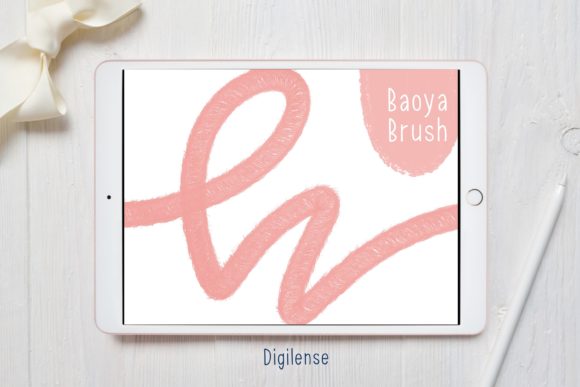
Digital lettering can sometimes feel stiff or impersonal, especially when you are just starting out with standard tools. The Procreate Lettering Brush - Baoya changes that dynamic by offering a texture and flow that mimics traditional ink on paper. This specific brush set is designed to help creators achieve smooth, professional-looking scripts without the frustration of fighting against digital resistance. Whether you are a seasoned graphic designer or a hobbyist looking to personalize your planner, having the right tool makes all the difference in how your final piece feels.
When you acquire this resource, you aren't just getting a single file; you are receiving a complete package tailored for ease of use. Inside the download, you will find a ZIP file containing the actual lettering Procreate brush alongside a helpful PDF guide titled "How to install procreate brush on ipad." This attention to detail ensures that even if you have never added custom tools to your app before, you can get up and running quickly. The value here lies not just in the aesthetic quality of the stroke, but in the seamless integration into your existing workflow.
Why Choose Baoya for Your Digital Scripts
The main appeal of the Procreate Lettering Brush - Baoya is its versatility. Unlike generic calligraphy brushes that might require perfect pressure control to look good, Baoya is engineered to be forgiving while still retaining an organic feel. It strikes a balance between structure and fluidity, making it an excellent choice for modern calligraphy, hand-lettered quotes, and logo design. For entrepreneurs and small business owners creating social media graphics, this brush allows for brand-consistent typography that stands out from the crowd of standard fonts.
Beginners often struggle with the "shaky line" phenomenon common in digital art. This brush helps mitigate that issue by providing a stable edge that smooths out minor jitters without making the line look artificially perfect. Educators and content creators will appreciate how quickly they can draft legible, beautiful text for worksheets, video thumbnails, or presentation slides. The goal of this tool is to remove technical barriers so you can focus on composition and creativity rather than fighting with software settings.
Practical Uses Across Different Fields
The applications for this brush extend far beyond simple practice sheets. Freelancers can use it to create custom wedding invitations or greeting cards that command higher prices due to their handmade appearance. Bloggers and marketers can utilize it to overlay engaging text on lifestyle photography, adding a personal touch that resonates with audiences. In an educational context, teachers can create visually appealing headers for classroom materials that capture students' attention.
Consider the scenario of a coach creating a workbook for their clients. Using the Procreate Lettering Brush - Baoya, they can hand-letter chapter titles and key takeaways, making the digital PDF feel more intimate and valuable. Similarly, YouTubers can craft unique channel art and video titles that maintain consistency across their brand. The brush works exceptionally well for both light-mode and dark-mode canvases, adapting to various color palettes and background textures.
Getting Started: Installation Made Simple
One of the most common hurdles for new iPad artists is installing custom assets. The process for the Baoya brush is straightforward, provided you follow the included instructions. Since you will receive a ZIP file with the lettering Procreate brush and a PDF file explaining the steps, you have everything needed to succeed. If you are unsure how to handle the compressed file, the guide suggests using a free app like FileExplorer, File Manager, or iZip to unzip the file first.
Once the file is unzipped, the installation offers two primary paths depending on your device setup. The easiest method is to choose "Open in Procreate" directly from your file manager. This action should automatically launch the app and import the brush into your library. However, technology doesn't always cooperate perfectly. If this is not an option, there is a reliable manual method that works every time.
- Open a new canvas in Procreate to access the main interface.
- Tap the paintbrush icon located at the top of the screen to open the Brushes panel.
- Look for the plus (+) button situated above the list of existing brushes and tap it to import a new brush.
- Navigate through your files to locate the folder containing your downloaded Procreate brush.
- Tap on the brush file, and it will instantly load into your current brush set.
This manual approach ensures that even if your iPad's file sharing settings are restrictive, you can still access your new tools. The included PDF serves as a handy reference if you ever need to reinstall the brush on a different device or after a software update.
Tips for Maximizing Your Results
While the Procreate Lettering Brush - Baoya is user-friendly, a few practical considerations can help you get the most out of it. First, pay attention to your canvas size. Working on a high-resolution canvas ensures that your lettering remains crisp, especially if you plan to print your designs or use them on large displays. Second, experiment with the opacity and flow settings within the brush studio. Although the default settings are optimized for general use, tweaking these parameters can give you finer control over shading and layering effects.
It is also important to consider the type of project you are undertaking. For fast-paced social media content, the speed and reliability of Baoya are ideal. For intricate, high-detail illustrations, you might want to combine this brush with finer liner tools to add definition to your curves. Remember that digital lettering is a skill that improves with practice; use the brush daily to build muscle memory and understand how it reacts to different speeds and angles of your Apple Pencil.
Final Thoughts on Digital Lettering
Investing in quality digital tools like the Procreate Lettering Brush - Baoya is an investment in your creative efficiency. It bridges the gap between traditional artistry and digital convenience, allowing you to produce work that feels authentic and polished. Whether you are designing a logo for a new venture, creating heartfelt cards for friends, or developing educational materials, this brush provides the foundation you need to express your ideas clearly. By following the simple installation steps and exploring its capabilities, you open up a world of typographic possibilities right at your fingertips.