Unlocking Festive Creativity with Holly Ivy Procreate Stamps
The digital art landscape has shifted dramatically in recent years, moving from complex desktop software to intuitive, touch-based interfaces that allow artists to create anywhere. At the heart of this revolution is Procreate, the industry-standard illustration app for iPad. However, even the most skilled illustrators know that starting from a blank canvas can sometimes be the hardest part of the creative process. This is where specialized toolsets like the Holly Ivy Procreate Stamps X 12 become invaluable assets for both hobbyists and professional designers.
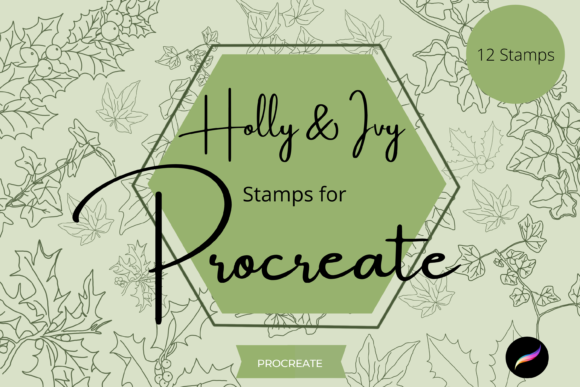
This collection of twelve unique, hand-drawn digital brushes is designed specifically to inject a sense of organic warmth and festive charm into digital projects. Unlike generic shapes or rigid vector graphics, these stamps carry the subtle imperfections and texture of traditional media, making them perfect for creating botanical artwork that feels alive. Whether you are designing a holiday greeting card, crafting custom wrapping paper, or developing assets for print-on-demand products, understanding how to leverage these specific tools can significantly streamline your workflow and elevate the quality of your final output.
The Versatility of Hand-Drawn Digital Botanicals
One of the defining characteristics of the Holly Ivy Procreate Stamps X 12 pack is its incredible versatility. In the world of digital design, assets are often categorized strictly as either "brushes" for painting or "stamps" for placing static images. This collection blurs those lines effectively. While they function as stamps to quickly place intricate holly leaves, berries, and ivy vines onto your canvas, they are engineered to be more than just clip art.
These elements are ideal for a wide array of DIY projects. For those involved in the print-on-demand industry, time is money. Creating seamless patterns or detailed border designs from scratch can take hours. With these pre-made, high-quality botanical elements, a designer can assemble a complex winter-themed pattern in minutes. The hand-drawn nature of the strokes ensures that when these designs are printed on physical goods—such as tote bags, mugs, or throw pillows—they retain an artisanal quality that consumers increasingly value over sterile, computer-generated imagery.
Beyond commercial applications, these brushes are a dream for personal crafters. Scrapbooking has evolved into the digital realm, and these stamps provide the perfect embellishments for digital planners and memory books. They can be used to frame photos, create decorative dividers, or add seasonal flair to invitation suites. Because the elements are botanical, they possess a timeless aesthetic that fits not just Christmas projects, but any winter-themed design or even general nature-inspired artwork throughout the colder months.
Mastering the Watercolour Illusion
A standout feature of this brush pack is its ability to mimic traditional watercolour techniques. While the files are digital stamps, they serve as an exceptional guide for creating full watercolour illustration art pieces. The textures within the brush strokes simulate the way pigment pools and spreads on cold-press paper, providing a level of realism that is difficult to achieve with standard digital tools.
To get the most out of this capability, there is a specific workflow recommended for users who want to create painterly effects rather than just placing static images. The key lies in layer management and opacity control. When using the Holly Ivy Procreate Stamps X 12 as a base for a painting, start by stamping the element onto the canvas. Immediately after placing it, reduce the opacity of that layer to around 30-50%. This creates a faint guideline or "underpainting."
Once the opacity is lowered, create additional layers above the stamp. Using standard painting brushes within Procreate, you can trace over the faint outline, adding your own colour variations, shadows, and highlights. This method allows you to use the complex shape of the holly or ivy as a structural guide while maintaining complete artistic freedom over the colour palette and lighting. It bridges the gap between using a shortcut and creating original art, ensuring your final piece looks unique despite starting with a preset stamp.
Integration with Textures and Clipping Masks
Digital art can sometimes feel too "clean" or flat. To combat this, modern workflows heavily rely on the integration of textures. The Holly Ivy Procreate Stamps X 12 are explicitly designed to work harmoniously with texture overlays and clipping masks, two of the most powerful features in Procreate.
When you apply these stamps to a textured background—such as a scanned watercolour paper texture or a rough canvas scan—the brush strokes interact with the underlying surface. Because the stamps have built-in transparency and varied density, the texture of the layer beneath shows through the gaps in the ink, creating a cohesive, unified look. This eliminates the common problem where digital elements look like they are simply "floating" on top of the background.
Furthermore, the use of clipping masks opens up endless possibilities for customization. You can stamp a large cluster of ivy onto your canvas, then create a new layer directly above it and hit "Clip." Anything you paint on this new layer will only appear within the boundaries of the ivy stamp below. This allows you to change colours instantly, add gradients, or even insert photographic images inside the silhouette of the botanical elements. This technique is particularly useful for creating typographic designs where letters are filled with festive greenery, or for producing complex composite images for wall art.
Customization: Resizing and Recolouring
No two projects are identical, and rigid assets often fail to meet specific design requirements. A major advantage of this brush pack is that all twelve brushes can be resized and recoloured to suit your specific needs. This flexibility is crucial for maintaining design consistency across different mediums.
Resizing can be accomplished in two primary ways within the Procreate ecosystem. First, you can adjust the physical size of the stamp before applying it by using the brush resize slider in the Procreate brush studio. This is ideal for quick adjustments while you are in the flow of drawing. Alternatively, once a stamp is already on the canvas, you can utilize the Move and Resize tool (the arrow icon in the toolbar). This allows for precise scaling, rotation, and distortion, enabling you to fit a holly branch perfectly into a tight corner of an invitation or stretch an ivy vine to span the width of a banner.
Recolouring is equally straightforward. Since these are digital brushes, they inherit the colour currently selected in your Procreate colour circle. However, for existing stamped elements, the power of Procreate's adjustment tools comes into play. You can use the Hue, Saturation, and Brightness adjustments to shift the greens of the holly to a more yellow-toned chartreuse or deepen the reds of the berries to a burgundy shade. This ensures that the Holly Ivy Procreate Stamps X 12 can adapt to any brand palette or artistic vision, rather than forcing you to work with a single fixed colour scheme.
Technical Requirements and Installation
Before diving into creation, it is essential to understand the technical ecosystem required to run these tools. These files are proprietary digital brushes formatted specifically for the Procreate application. Consequently, they will only work within the Procreate app on an iPad. They are not compatible with Photoshop, Illustrator, or Android-based drawing apps.
To utilize this pack effectively, you need an iPad (iPad Pro is recommended for the best experience with the Apple Pencil) with the Procreate app installed. The Apple Pencil is highly recommended, if not strictly necessary, to take full advantage of the pressure sensitivity and tilt features that might be embedded in the brush dynamics, although the stamping function itself works with touch as well.
The installation process involves a few steps that some new users might find unfamiliar. Upon purchase, you will receive a download link. You will need a platform to download these files to, such as iCloud Drive, Dropbox, or Google Drive, accessible from your iPad. The files usually come in a compressed ZIP format. Therefore, you must have a program or the built-in iOS Files app capability to unzip these archives. Once unzipped, the `.brushset` file can be tapped, which will automatically import the entire collection of twelve brushes directly into your Procreate library, ready for immediate use.
In summary, the Holly Ivy Procreate Stamps X 12 represent a convergence of traditional aesthetic appeal and modern digital efficiency. By offering a blend of ready-to-use stamps and flexible painting guides, they cater to a broad spectrum of creators. From the casual DIY enthusiast looking to spruce up a holiday card to the professional designer managing tight deadlines for print-on-demand stores, this toolset provides the botanical elegance needed to make projects stand out. With the ability to resize, recolour, and blend seamlessly with textures, these brushes are not just shortcuts; they are foundational elements for building beautiful, festive digital artwork.