Unlock Your Creative Potential with the Botanical Stamp Brush Bundle
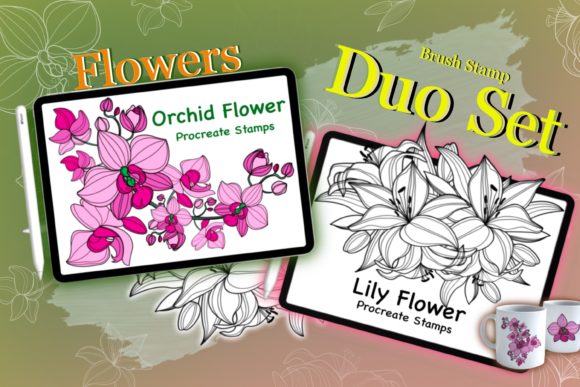
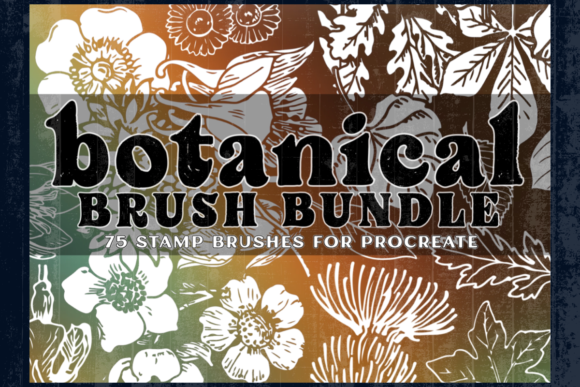
Digital illustration often feels like a balancing act between technical skill and artistic vision. You might have a clear idea of a lush garden or an intricate floral border, but rendering every single petal and vein from scratch can be time-consuming and technically demanding. This is where the Botanical Stamp Brush Bundle steps in to bridge the gap between concept and completion. Designed specifically for Procreate 5, this collection includes two distinct brush sets totaling 75 brushes: 30 dedicated floral stamp brushes and 45 leaf form stamp brushes. It is a toolset built to elevate your designs, allowing you to compose complex botanical scenes with speed and precision.
However, owning a powerful tool does not automatically guarantee masterpiece results. Many creators, from hobbyists to professional marketers, fall into common traps when integrating stamp brushes into their workflow. Understanding these pitfalls before you begin can save you hours of frustration and ensure your final artwork looks polished rather than repetitive.
The Trap of Repetition and How to Avoid It
The most frequent mistake users make when downloading a new stamp bundle is relying too heavily on the default settings. When you select a floral stamp from the 30 available options and tap it repeatedly onto the canvas, the result can look mechanical. Nature is inherently chaotic and varied; no two flowers bloom in the exact same orientation or scale. If your digital garden looks like a factory-printed wallpaper, you have likely fallen into the repetition trap.
To counter this, you must treat these stamps as building blocks rather than finished solutions. The Botanical Stamp Brush Bundle is designed with variability in mind, but it requires your input to shine. Before placing a stamp, adjust the size slightly. Rotate the brush tip using Procreate's gesture controls to change the angle of the bloom. Furthermore, vary the opacity. A flower in the background should not have the same crisp intensity as one in the foreground. By layering these 75 brushes with subtle variations in scale, rotation, and transparency, you create depth and organic movement that mimics real life.
Misunderstanding Compatibility and File Management
A critical, often overlooked detail involves software compatibility. This bundle is compatible only with Procreate 5. Users attempting to import these files into older versions of the app, or mistakenly trying to use them in other raster programs like Photoshop without conversion, will find themselves stuck. This incompatibility leads to unnecessary stress and wasted time troubleshooting why the brushes won't appear in the library.
Before purchasing or downloading, verify your iPad is running a version of Procreate that supports these specific brush engines. Once imported, another common error is poor file organization. With 45 leaf forms and 30 floral stamps, your brush library can quickly become cluttered if you do not categorize them immediately. Create specific brush sets within Procreate named "Botanical Flowers" and "Botanical Leaves." This simple organizational step ensures that when you are in the flow of creation, you aren't scrolling endlessly to find the right fern or rose, thereby maintaining your creative efficiency.
Ignoring Layer Hierarchy and Composition
Stamp brushes are incredibly efficient, which can tempt users to place everything on a single layer. This approach severely limits your ability to edit the composition later. If you realize a leaf is covering a flower petal in the wrong way, or if you want to adjust the color of a specific cluster without affecting the whole image, a flat file structure makes these corrections nearly impossible without starting over.
A better approach is to embrace non-destructive editing. Use separate layers for different elements of your botanical design. For instance, keep your large focal flowers on one layer, your filler greenery on another, and your background textures on a third. This hierarchy allows you to use clipping masks to add shadows or highlights to specific leaves without altering the original stamp. It also enables you to move elements around freely until the composition feels balanced. Remember, the goal of the Botanical Stamp Brush Bundle is to speed up your workflow, not to lock you into a rigid design.
Overlooking Color Customization
Many beginners assume that stamp brushes must be used in their default black or white state, intending to color them in later using complex blending modes. While this is a valid technique, it is not the only way to utilize these tools effectively. Some users struggle because they try to force a monochromatic stamp into a vibrant scene without adjusting the hue first, leading to a disjointed look where the stamps feel "pasted on."
To integrate these stamps seamlessly, experiment with Procreate's color dynamics settings or simply change your active color before stamping. You can also apply gradient maps or adjustment layers after the fact. The 45 leaf form brushes, for example, can instantly transform from a deep forest green to an autumnal orange with a simple hue shift. Testing how these brushes interact with different color palettes before committing to a full illustration helps prevent the need for major revisions down the line.
Evaluating Value Beyond the Count
When evaluating whether this bundle is right for your projects, do not fixate solely on the number "75." A high brush count does not always equal high utility if the styles do not match your aesthetic. Some creators download massive packs only to find they only use three brushes regularly. Before diving deep into a project, take time to test the entire range. Create a swatch sheet using all 30 floral and 45 leaf brushes.
This practice serves two purposes. First, it familiarizes you with the unique texture and shape of each stamp. Second, it helps you identify which brushes complement each other. You might discover that a specific fern pairs perfectly with a particular wildflower, creating a go-to combination for your future designs. This proactive exploration ensures you get the maximum return on your investment and prevents the "analysis paralysis" that occurs when facing a large, unorganized library during a deadline.
Final Thoughts on Elevating Your Artwork
The Botanical Stamp Brush Bundle offers a fantastic opportunity for entrepreneurs, bloggers, and artists to produce high-quality visual content efficiently. Whether you are designing wedding invitations, creating social media graphics, or illustrating a children's book, these tools can significantly reduce production time. However, the quality of your output ultimately depends on how thoughtfully you apply them.
By avoiding the pitfalls of repetition, respecting software limitations, maintaining clean layer structures, and customizing colors, you transform simple stamps into sophisticated art. Take the time to learn the nuances of these 75 brushes. Treat them as partners in your creative process rather than shortcuts. With the right approach, you will find that your designs not only look more professional but also convey the natural beauty and complexity that makes botanical art so enduringly popular.