Procreate Leaves: Natural Digital Art Brushes
Digital illustration often struggles to capture the organic unpredictability of nature. While software offers precision, it can sometimes feel too sterile or rigid compared to traditional media. This is where specialized tools like Procreate Leaves bridge the gap, offering artists a way to infuse their work with the texture and randomness found in the real world. Whether you are sketching a quick concept for a client or painting a detailed botanical study for personal enjoyment, having the right assets changes how you approach the canvas.
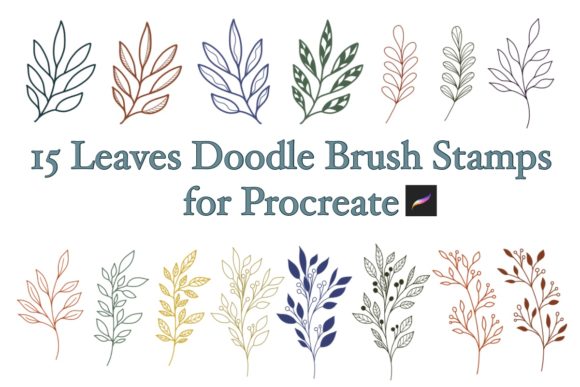
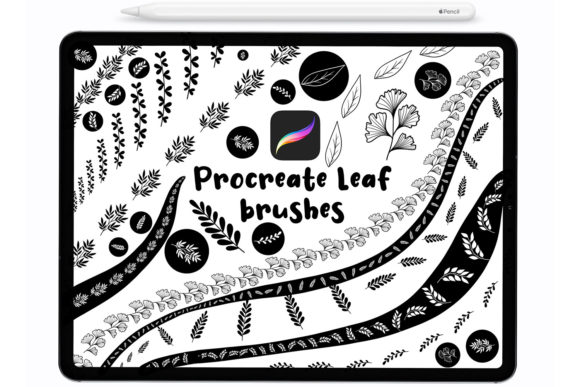
The core of this toolset is a collection designed to mimic the diversity of foliage. Instead of manually painting every vein and edge of a leaf, which can be time-consuming and technically demanding, these brushes provide instant, high-quality stamps. The set includes 30 distinct Procreate brushes, each engineered to behave like a physical stamp. They are pressure-sensitive, meaning the harder you press with your Apple Pencil, third-party stylus, or even your finger, the more opaque or defined the mark becomes. This dynamic response allows for a natural flow that static images simply cannot replicate.
Why Different Creators Value Organic Textures
The appeal of natural elements in digital art varies significantly depending on who is holding the stylus. For a professional illustrator, efficiency is often the primary metric. They might use these leaf stamps to quickly populate background environments in a children's book or add foreground depth to a character portrait without spending hours on repetitive details. For them, the value lies in speed and consistency; they need a tool that integrates seamlessly into an existing workflow and delivers reliable results under tight deadlines.
In contrast, a beginner or hobbyist might prioritize the learning curve and the joy of creation. Someone just starting their journey in digital art may find drawing complex organic shapes intimidating. Using pre-made leaf stamps allows them to create beautiful, professional-looking compositions immediately, building confidence as they learn other aspects of the software. It removes the barrier of technical skill, letting them focus on composition, color theory, and storytelling.
Small business owners and entrepreneurs running brands focused on wellness, eco-friendly products, or handmade goods often look for assets that convey authenticity. A logo or social media graphic featuring hand-drawn style leaves suggests growth, nature, and care. For these users, the flexibility to change colors and opacity is crucial. They need to match the brand's specific palette exactly, ensuring the artwork feels custom rather than generic. The ability to tweak the size and blend mode of each stamp means one set of brushes can generate endless variations suitable for packaging, websites, or marketing materials.
Technical Flexibility and Customization
One of the most powerful aspects of working with digital brushes is the level of control they offer over the final output. Unlike physical stamps that require ink pads and paper, these digital tools allow for infinite experimentation. You can alter the color of a leaf instantly, testing how a sage green looks against a cream background before committing to the design. You can adjust the opacity to create layered, translucent effects that mimic light filtering through a canopy, or scale the size from a tiny sprout to a large monstera leaf with a simple pinch gesture.
This adaptability extends to the hardware you use. While many assume high-end tools require the latest Apple Pencil, these brushes are designed to be inclusive. They function smoothly with third-party styluses, making them accessible to students or creators on a budget. Even using a finger works effectively for quick mockups or when a stylus isn't handy. This compatibility ensures that the barrier to entry remains low, regardless of your equipment setup.
Furthermore, the technical requirements are minimal. These brushes are compatible with Procreate version 4.1 and above. This broad compatibility means that users with older iPads or those who haven't updated their software recently can still access these features. It respects the user's current ecosystem rather than forcing an upgrade, which is a significant consideration for educators managing classroom devices or freelancers working with older hardware.
Practical Applications Across Industries
Understanding how to apply these tools requires looking at specific use cases. An educator creating visual aids for a biology lesson might use the variety in the 30-brush set to show different leaf shapes and structures clearly. They can layer colors to highlight veins or edges, turning a simple illustration into an informative diagram. The pressure sensitivity helps here too, allowing for emphasis on specific parts of the plant by pressing harder to darken certain areas.
Bloggers and content creators often need unique header images or dividers to break up text. A row of scattered leaves created with these stamps adds a polished, custom touch to a website that stock photography often lacks. Because the brushes are stamps, placement is precise. You can arrange them to frame a title or create a border that feels hand-crafted. The ability to duplicate and rotate each stamp ensures no two leaves look exactly identical, maintaining that organic feel.
For freelance designers working on wedding invitations or event stationery, the aesthetic quality is paramount. Clients often request "botanical" or "rustic" themes. Using a dedicated leaf set ensures a cohesive look across the entire suite of materials—from save-the-dates to menus. The high resolution of the stamps ensures that even when printed, the edges remain crisp and detailed, avoiding the pixelation that can plague lower-quality digital assets.
Getting Started: Import and Workflow
Integrating new tools into your library should be straightforward, and the process for these brushes is designed with simplicity in mind. Once you have downloaded the files, the import process is automatic and intuitive. Navigate to your files on your iPad, locate the downloaded brush set, and simply double-tap the file. Alternatively, you can right-click (or long-press) on the file and select the import option. The system will recognize the format and automatically open Procreate, installing the set directly into your brush library.
There is no need for complex unzipping or manual folder navigation. This ease of installation reflects the broader philosophy of the tool: removing friction so you can start creating immediately. Once imported, you can find the set in your brush panel, ready to be customized. It is helpful to experiment with the settings immediately. Try creating a new canvas and testing each of the 30 brushes to understand their unique textures. Some may be better for dense foliage, while others work well for sparse, delicate accents.
Ultimately, whether you are a marketer looking to refresh a brand identity, a teacher preparing engaging lessons, or an artist exploring new styles, the utility of these brushes lies in their versatility. They serve as a foundation upon which you can build complex scenes or add subtle details. By offering a balance of automation through stamping and control through pressure sensitivity and color adjustment, they cater to a wide spectrum of creative needs. The goal is not just to place an image on a screen, but to enhance the narrative of your project with elements that feel alive and intentional.
As you evaluate whether this tool fits your goals, consider your current projects. Do you need speed? Are you looking to improve the organic feel of your digital paintings? Or do you simply need a reliable asset that works across different devices and software versions? If the answer to any of these is yes, incorporating a specialized set like this can streamline your process and elevate the quality of your visual communication.