Mastering Spooky Designs: A Practical Guide to Halloween Frames Procreate Brushes
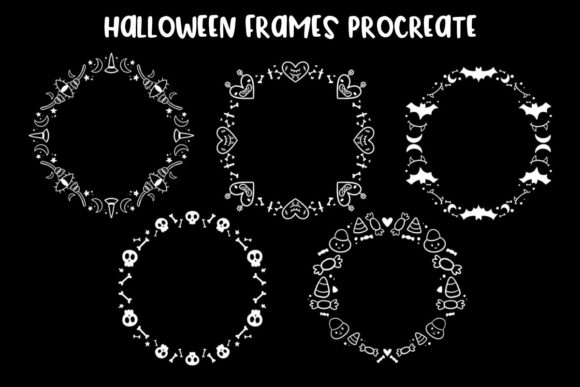
The thrill of creating seasonal artwork often hinges on having the right tools at your disposal. As October approaches, digital artists and content creators scramble to produce engaging visuals that capture the eerie yet festive spirit of the holiday. This is where a specialized Halloween Frames Procreate Brush collection becomes invaluable. These digital assets are designed to streamline your workflow, offering pre-made borders featuring bats, skulls, candy, and other iconic motifs. However, simply downloading a set of brushes does not guarantee professional results. Many creators, from seasoned freelancers to enthusiastic hobbyists, fall into common traps when selecting and applying these tools. Understanding the nuances of these digital assets can mean the difference between a polished masterpiece and a cluttered, amateur-looking design.
One of the most frequent misunderstandings involves compatibility and software requirements. It is easy to assume that any brush file will work across all digital art platforms, but this specific collection requires Procreate on iOS and iPadOS. Attempting to import these .brushset files into desktop software like Photoshop or free alternatives without proper conversion often leads to frustration and wasted time. Before purchasing or downloading, always verify that your device meets the operating system requirements. Using the wrong software not only prevents the brushes from loading but can also corrupt your existing library if you force incompatible file types. The solution is simple: ensure you are working within the Procreate ecosystem to access the full fidelity of the brushstrokes as intended by the creator.
Avoiding Visual Clutter and Composition Errors
When you first open a new set of spooky frames, the temptation is to use every single element in one composition. This is a classic mistake that plagues beginners and even some experienced marketers rushing to meet deadlines. A frame containing bats, skulls, and candy all at once can easily overwhelm the central subject of your artwork. The purpose of a frame is to enhance the focal point, not compete with it. When a border is too busy, it distracts the viewer's eye and diminishes the impact of your message or illustration.
To avoid this, adopt a minimalist approach. Select one or two thematic elements from the brush set that align with your specific design goal. If you are creating a promotional graphic for a bakery, focus on the candy-themed borders and leave out the grim skulls. If you are designing a horror story cover, lean into the darker elements like bats and cobwebs. By curating which parts of the Halloween Frames Procreate Brush collection you use, you maintain visual hierarchy. Remember, white space (or in this case, negative space) is just as important as the ink you lay down. A clean, well-defined border draws the eye inward, whereas a chaotic one pushes it away.
Misconceptions About Resolution and Scalability
Another critical area where creators stumble is regarding resolution and scalability. Some users assume that because these are digital brushes, they can be stretched infinitely without losing quality. While vector graphics offer infinite scalability, raster-based brushstrokes in Procreate have limits based on your canvas size. If you create a small canvas and then try to expand a large, intricate skull frame to fit a billboard-sized print later, you will encounter pixelation and jagged edges. This severely affects the professionalism of your final output, especially for entrepreneurs printing merchandise or marketers creating large-format ads.
The corrective strategy here is proactive planning. Always start your project on a canvas that matches your largest intended output dimension. If you anticipate needing high-resolution prints, set your DPI to 300 from the very beginning. When applying the brush frames, treat them as fixed elements rather than stretchable bands. If a frame feels too tight, it is better to repaint it at the correct scale or adjust your canvas size before adding details. This foresight ensures that your spooky designs remain crisp whether viewed on a smartphone screen or a printed flyer.
Color Harmony and Blending Modes
A frequently overlooked detail when using themed brushes is color integration. Many default brush sets come in standard black or orange. Dropping these directly onto a colorful background without adjustment can make the frame look pasted on rather than integrated. This lack of cohesion breaks the immersion of the artwork. For instance, a stark black bat silhouette might look harsh against a soft, pastel purple background intended for a children's party invitation.
To elevate your design, utilize Procreate's blending modes and color adjustment tools. Instead of leaving the brushstroke in its default color, sample a darker shade of your background color for the frame to create a subtle, tonal effect. Alternatively, experiment with blending modes like Multiply or Overlay to allow the texture of the paper or background to show through the brushstroke. This technique adds depth and makes the frame feel like part of the original illustration. Taking these extra steps transforms a generic asset into a custom component of your brand identity.
- Check File Formats: Ensure you are downloading
.brushsetfiles specifically for Procreate, not generic image files. - Plan Canvas Size: Set your resolution high enough for your biggest potential use case to avoid pixelation.
- Curate Elements: Do not use every icon in the set; choose only those that support your specific theme.
- Adjust Colors: Modify the hue and blending modes of the brushes to match your unique color palette.
- Test on Devices: Preview your design on both mobile and desktop views to ensure the frame doesn't obscure key text.
Furthermore, consider the context in which your design will be viewed. Social media feeds are fast-paced, and users scroll quickly. A frame that is too intricate might disappear on a small mobile screen. Conversely, a frame that is too simple might get lost in a crowded marketplace display. Test your designs at actual size before finalizing them. If the details of the candy corn or the texture of the spiderweb vanish when shrunk to thumbnail size, simplify the brush application or increase the contrast. This practical step ensures your communication remains clear across all platforms.
Ultimately, the value of a Halloween Frames Procreate Brush collection lies not just in the files themselves, but in how strategically you deploy them. By avoiding the pitfalls of overuse, ignoring resolution limits, and neglecting color harmony, you can produce work that stands out for its quality and thoughtfulness. Whether you are a small business owner promoting a seasonal sale or an educator creating festive classroom materials, these tools are powerful allies when used with intention. Take the time to understand the mechanics of the brushes, respect the technical constraints of your canvas, and always prioritize the clarity of your visual message. With these practices in place, your Halloween designs will be not only spooky and fun but also professionally executed and highly effective.