Mastering Digital Organization with the Procreate Brush Planner
In the rapidly evolving landscape of digital creativity, the line between artistic expression and practical organization has become increasingly blurred. For years, designers and hobbyists relied on separate tools for sketching concepts and planning their workflows. However, the emergence of specialized tools like the Procreate Brush Planner has revolutionized how creators approach daily tasks, project management, and aesthetic consistency within a single application. This shift represents more than just a new set of digital assets; it signifies a fundamental change in how we visualize productivity.
The concept of a digital planner is not entirely new, but the specific utility offered by stamp brushes designed for Procreate brings a unique tactile feel to screen-based planning. Unlike standard typing or rigid template software, these brushes allow users to hand-letter, draw, and structure their days with the fluidity of pen on paper, combined with the flexibility of digital editing. Whether you are a small business owner tracking inventory, a student organizing study schedules, or a creative professional managing client deadlines, understanding the capabilities of these tools is essential for maximizing efficiency.
The Anatomy of a Digital Planning System
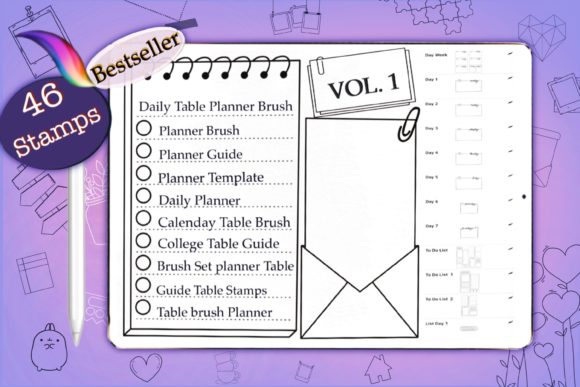
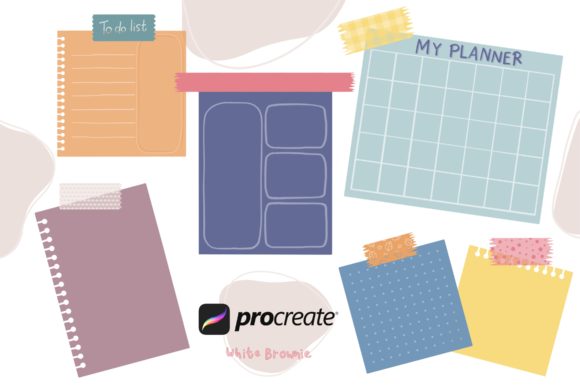
At the heart of this workflow lies a comprehensive collection of assets designed specifically for the iOS ecosystem. A robust Procreate Brush Planner kit typically includes a diverse array of elements that cater to various organizational needs. For instance, a standard high-quality pack might offer 18 distinct table layouts. These are not merely static images but dynamic stamps that can be resized, recolored, and repositioned without losing clarity. They serve as the backbone for weekly spreads, monthly calendars, and habit trackers.
Beyond structural elements, the inclusion of 7 text stamps provides immediate labeling capabilities. Instead of switching fonts or struggling with the text tool for every header, users can instantly stamp "To Do," "Notes," "Priority," or "Ideas" onto their canvas. This streamlines the creation process, allowing the user to focus on the content of their plan rather than the mechanics of setting it up. Furthermore, a collection of 15 functional elements and 5 decorative accents adds personality to the planner. These might include checkboxes, arrows, stars, or floral motifs that make the act of planning feel less like a chore and more like a creative session.
One often overlooked but critical component is color theory in planning. Many premium brush sets now include a bonus color palette, often featuring around 30 curated colors. This ensures that every table, text element, and decoration harmonizes perfectly. For users who struggle with design choices, having a pre-selected palette eliminates decision fatigue, resulting in a visually cohesive planner that is pleasing to look at and easy to read.
Compatibility and Technical Considerations
Before diving into the creation of digital planners, it is vital to understand the technical environment required. The Procreate Brush Planner is engineered exclusively for the Procreate application on iPad, specifically requiring version 5.0 or higher. This specificity is due to the advanced brush engine introduced in recent updates, which allows for complex stamp behaviors and texture interactions that older versions cannot support.
It is crucial for potential users to note a significant limitation: these brushes do not work in Photoshop or other desktop-based graphic design applications. The file format utilized by Procreate (`.brush` and `.brushset`) is proprietary to the iOS app. Attempting to import these files into Adobe Photoshop or Affinity Designer will result in errors or unrecognized file types. This distinction is important for professionals who operate in a hybrid workflow across multiple devices. If your primary planning happens on a desktop computer, this tool may not suit your needs unless you are willing to transition your planning phase entirely to the iPad.
Additionally, these products are distributed as digital files available for instant download. There is no physical shipment involved. Upon purchase, the user receives a file that must be imported into the Procreate app via the "Import" function in the Brush Library. This immediacy allows creators to start organizing their lives within minutes of acquisition, but it also requires a basic level of digital literacy regarding file management on iOS devices.
Real-World Applications and User Scenarios
The versatility of the Procreate Brush Planner extends far beyond simple daily to-do lists. Its application varies significantly depending on the user's profession and goals.
- The Freelance Creative: For graphic designers and illustrators, time management is currency. Using the 18 table stamps, a freelancer can create a weekly client tracker. They can map out deliverables, set deadlines, and log hours billed. The ability to hand-draw notes alongside these structured tables helps in brainstorming visual concepts directly within the schedule, merging the planning and creative phases.
- The Small Business Owner: Entrepreneurs often juggle inventory, social media scheduling, and financial tracking. The text stamps and element brushes allow for the rapid creation of content calendars. A business owner can layout a month's worth of Instagram posts, using the decorative elements to highlight special promotions or sales events, ensuring a balanced and strategic approach to marketing.
- The Student and Educator: Academic life requires rigorous organization. Students can utilize the brush set to build semester planners, tracking assignment due dates and exam schedules. The visual nature of the planner aids in memory retention, as the act of physically writing or stamping tasks reinforces commitment. Educators can similarly use these tools to plan lesson structures and track student progress in a visually engaging format.
- The Wellness Enthusiast: Mental health and habit formation are popular uses for digital planners. The 30-color palette can be used to color-code mood trackers or water intake logs. The decorative brushes add an element of joy to the routine of self-care, making the user more likely to engage with the planner consistently.
Evaluating Suitability for Your Workflow
While the benefits are clear, adopting a Procreate Brush Planner system is not the right choice for everyone. It is best suited for individuals who already own an iPad and enjoy the tactile experience of drawing. If you prefer the speed of typing and the automatic synchronization of cloud-based text editors like Google Docs or Notion, the manual nature of stamping and arranging elements in Procreate might feel too time-consuming.
However, for those who find traditional digital tools sterile and uninspiring, this approach offers a compelling middle ground. It retains the organizational power of a spreadsheet while injecting the soul of a sketchbook. The learning curve is generally low, especially for those familiar with the Procreate interface, but mastering the layering and grouping of elements to keep the file manageable does require some practice.
Furthermore, the output potential is vast. These planners are not limited to on-screen viewing. Because they are created at high resolution, they can be exported as PDFs or images and printed for physical use. This creates a hybrid workflow where a user designs their week digitally, prints it out to stick on a fridge or carry in a binder, and then archives the digital copy for future reference. This dual capability enhances the value proposition of the brush set significantly.
Maximizing the Value of Your Digital Assets
To truly benefit from a Procreate Brush Planner, one must move beyond passive consumption of the brushes. Active experimentation is key. Users should encourage themselves to mix the 15 elements in unconventional ways, perhaps combining a table layout with decorative borders to create unique section headers. The 7 text stamps should be viewed as starting points; users can duplicate them and alter the color using the procreate color drop feature to create variations that fit specific themes.
It is also advisable to organize your brush library within Procreate. Creating a dedicated group for your planner brushes ensures they are always accessible when inspiration strikes. Regularly updating your templates and experimenting with the 30-color palette to match seasonal themes can keep the planning process fresh and engaging throughout the year.
In conclusion, the integration of specialized stamp brushes into the planning routine represents a sophisticated evolution of personal productivity. By leveraging the Procreate Brush Planner, users gain the ability to craft highly personalized, visually stunning, and functionally robust organizational systems. While the requirement for specific hardware and software limits its universal appeal, for the iPad-centric creator, it offers an unparalleled blend of artistry and utility. Whether用于 tracking business metrics, planning academic semesters, or simply organizing daily chores, these tools empower users to take control of their time with style and precision.
As the digital creation space continues to grow, tools that bridge the gap between function and form will remain indispensable. The Procreate Brush – planner to do list Stamp Brushes exemplify this trend, providing a tangible way to structure the intangible flow of time and ideas. For anyone looking to elevate their digital planning game, exploring the possibilities within this ecosystem is a worthwhile endeavor.