Expressing Affection Digitally: A Guide to the Procreate Brush Stamp Love Dad Collection
In the evolving landscape of digital art, the tools we choose often dictate the emotional resonance of our final pieces. While technical precision is valuable, there is a growing demand for assets that bring warmth, personality, and a hand-crafted feel to digital canvases. The Procreate Brush Stamp Love Dad collection represents a specific niche within this ecosystem, offering creators a curated set of tools designed to infuse projects with sentiments of familial love and appreciation. This article explores the utility, characteristics, and practical applications of this brush set and its accompanying bonus palette, helping you determine if it aligns with your creative workflow.
Understanding the Asset: More Than Just a Stamp
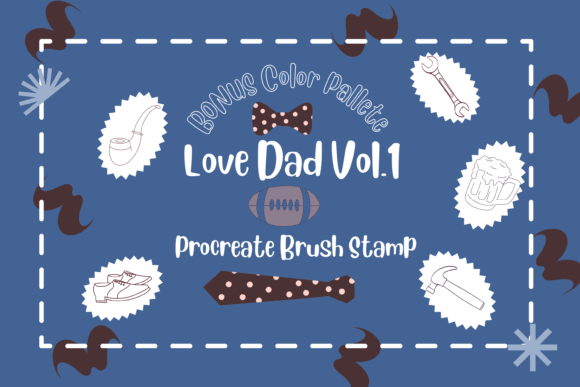
At its core, the Procreate Brush Stamp Love Dad is not merely a static image but a dynamic toolset engineered for flexibility. The collection includes 9 individual stamps, each hand-drawn directly within the Procreate environment. This origin story is crucial; because they are native to the app, they retain the organic texture and line quality that often gets lost when importing external graphics.
The primary value proposition here is adaptability. Unlike rigid PNG overlays, these stamp brushes allow you to mix and match your design elements seamlessly. You have full control over the scale and resize functions, meaning a single stamp can serve as a subtle background texture or a bold focal point depending on your canvas size. Furthermore, the ability to adjust opacity and color settings means these stamps are not locked into a single aesthetic. Whether you need a vibrant, saturated look for a birthday card or a muted, watercolor effect for a scrapbook page, the brush engine responds to your input.
The Vol. 1 Bonus Color Palette
Complementing the brush set is the Procreate Brush Stamp Love Dad vol.1 Bonus Color Palette. Color theory can be a stumbling block for many creators, especially when trying to evoke specific emotions like warmth and nostalgia associated with fatherhood. This included palette, titled "30 colors palette USA.swatches," provides a pre-curated selection of thirty hues.
By integrating these swatches directly into your workflow, you eliminate the guesswork of color matching. The palette is designed to harmonize with the stroke textures of the stamps, ensuring that the final output looks cohesive. For professionals working under tight deadlines, having a ready-to-use color scheme that complements the brush strokes can significantly speed up the iteration process.
Technical Requirements and Compatibility
Before investing time in downloading and experimenting with these assets, it is vital to understand the technical ecosystem they inhabit. The Procreate Brush Stamp Love Dad brushes are exclusive to the Apple iPad ecosystem. To utilize them effectively, you require:
- An iPad Pro or a compatible iPad model.
- An Apple Pencil or a compatible, pressure-sensitive stylus.
- The Procreate App installed on your device.
It is important to manage expectations regarding software compatibility. These brushes DO NOT work in Photoshop, Illustrator, or any other desktop-based graphic design application. They are coded specifically for Procreate's brush engine, which interprets pressure, tilt, and flow differently than raster programs on a computer. Attempting to use them outside of this environment will result in incompatibility. This limitation ensures high performance within the app but restricts cross-platform usage for those who rely on a hybrid desktop-mobile workflow.
Installation and Setup: A Step-by-Step Guide
One of the most common friction points for digital artists is the installation of third-party assets. The Procreate Brush Stamp Love Dad package is delivered as a single ZIP file. Inside, you will find the Love_Dad.brushset and the 30 colors palette USA.swatches copy. Proper installation is key to accessing the full functionality of the tools.
- Unzip the File: Before attempting to upload anything to Procreate, you must unzip the downloaded file on your iPad. Trying to import a zipped folder directly will not work.
- Locate the Files: Open the "Files" app on your iPad and navigate to the folder where you downloaded the assets.
- Initiate Import: Tap and hold the
.brushsetfile with your finger or Apple Pencil. - Select Share: Choose "Share" from the context menu that appears.
- Find Procreate: If you do not immediately see "Open in Procreate," scroll the options and click on "More." Locate "Open in Procreate" in the list and select it.
- Verify Installation: Open your project in Procreate. Click on the brush icon at the top right. You should see a new collection labeled "Love Dad" containing your 9 stamps.
- Import the Palette: Repeat the sharing process for the
.swatchesfile. Once opened, tap the color circle icon, go to the Palettes tab, and ensure the new 30-color set is active.
Following this tutorial ensures that the brushes behave correctly, retaining their pressure sensitivity and texture properties.
Practical Applications and Real-World Scenarios
Who benefits most from the Procreate Brush Stamp Love Dad? The utility extends beyond simple hobbyists. Here are several scenarios where these tools add significant value:
Digital Greeting Cards and Invitations
For small business owners selling digital stationery, time is money. Using pre-made, hand-drawn stamps allows for the rapid creation of unique Father's Day cards, birthday invitations, or anniversary notes. The ability to recolor the stamps means you can offer clients custom color schemes without redrawing elements from scratch.
Social Media Content Creation
Influencers and content managers often need to produce visually engaging stories or posts quickly. These stamps can serve as decorative overlays for photos of family moments, adding a personalized, artistic touch that stands out against generic filters. The "hand-drawn" aesthetic appeals to audiences seeking authenticity.
Scrapbooking and Memory Keeping
Digital scrapbookers can use these stamps to annotate photos or create thematic headers. The 9 individual designs likely offer variety in typography and iconography related to "Dad," allowing for diverse layouts within a single album. The scalability ensures they fit perfectly whether the canvas is square for Instagram or landscape for a printed photo book.
Evaluating Suitability: Strengths and Considerations
When deciding whether to incorporate the Procreate Brush Stamp Love Dad into your library, consider the nature of your projects.
Strengths: The primary strength lies in the organic quality of the strokes. Because they are hand-drawn in Procreate, they avoid the sterile, vector-like look of some commercial clip art. The inclusion of a matching color palette demonstrates a thoughtful approach to user experience, reducing the cognitive load on the artist. The flexibility to change opacity and blend modes offers extensive creative freedom.
Limitations: As noted, the exclusivity to the iPad/Procreate ecosystem is a hard boundary. If your workflow relies heavily on desktop software, these assets will sit unused. Additionally, with only 9 stamps, the variety is somewhat limited compared to massive mega-bundles. However, for focused projects revolving around the theme of fatherhood, this curation prevents choice paralysis.
Expectations: Users should expect a plug-and-play experience once the files are correctly unzipped and imported. The "fun" and "simple" descriptors in the product details suggest these are intended for quick embellishment rather than complex, multi-layered illustration construction. They are building blocks, not the entire house.
Conclusion
The Procreate Brush Stamp Love Dad collection serves as a specialized toolkit for creators looking to inject heartfelt emotion into their digital work. By combining versatile stamp brushes with a harmonized color palette, it addresses both the technical and aesthetic needs of modern digital artists. While its utility is bound by the Procreate platform, for iPad users, it offers a streamlined path to creating professional, personalized, and emotionally resonant designs. Whether you are a seasoned designer or a parent looking to create a special gift, understanding how to leverage these hand-drawn assets can elevate the quality and efficiency of your creative output.