Evaluating the Line Art Flowers Procreate Brush Stamp for Digital Design
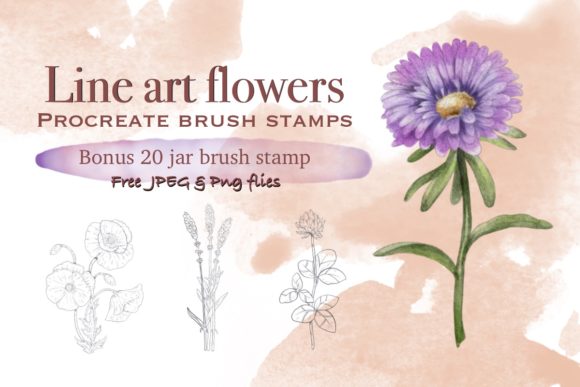
Digital illustration and graphic design have evolved significantly with the advent of tablet-based applications, offering artists tools that mimic traditional media while providing unparalleled flexibility. Among the vast array of digital assets available to creators, stamp brushes have become a staple for streamlining workflows and adding consistent decorative elements to projects. The Line Art Flowers Procreate Brush Stamp represents a specific category of these tools, designed exclusively for the Procreate application on iPad. This collection typically includes a primary set of 12 hand-drawn flower stamps, often accompanied by a bonus jar containing an additional 20 brush stamps. Understanding the capabilities, limitations, and ideal use cases for this type of asset is essential for designers deciding whether it aligns with their creative goals.
Understanding the Asset and Its Composition
The core of this product is a set of pre-drawn line art illustrations converted into functional brush stamps within the Procreate ecosystem. Unlike standard drawing brushes that create strokes based on movement, stamp brushes place a complete image onto the canvas with a single tap. The Line Art Flowers Procreate Brush Stamp set is characterized by its hand-drawn aesthetic, ensuring that the floral elements possess an organic, authentic feel rather than a generic, vector-like appearance.
Upon purchase, users receive a single ZIP file. Inside, the content is organized into two distinct categories: the main collection of 12 flower designs and a supplementary "Bonus Jar" featuring 20 additional stamp brushes. It is critical to note that these files are formatted specifically as .brushset or .brush files, which are proprietary to Procreate. This means the assets are not compatible with Adobe Photoshop, Clip Studio Paint, or any other desktop or mobile illustration software. The requirement for an iPad (specifically models compatible with the Procreate app) and a pressure-sensitive stylus, such as the Apple Pencil, is absolute for utilizing these tools effectively.
Functional Capabilities and Customization
One of the primary reasons designers evaluate stamp brushes is the balance between speed and customization. A common misconception about stamp brushes is that they are static images that cannot be altered. However, the Line Art Flowers Procreate Brush Stamp offers significant flexibility. Once imported, each stamp behaves like a dynamic tool. Users can scale the flowers up or down without losing resolution, as the underlying data remains vector-like in its scalability within the app's engine until rasterized by the user's action.
Furthermore, these stamps allow for full color manipulation. While the default state is often black line art, the color palette in Procreate can be changed instantly, allowing a single flower stamp to appear in gold, pastel pink, or deep navy with a simple selection change. Opacity controls enable artists to create watercolor-like effects or subtle background textures by lowering the flow of the stamp. Additionally, the rotation and spacing settings within the brush studio can be adjusted, allowing the user to scatter the flowers randomly or align them in a precise pattern. This level of control makes the Line Art Flowers Procreate Brush Stamp suitable for both quick mockups and detailed final artwork.
Ideal Use Cases and Applications
For professionals and hobbyists alike, the decision to integrate these brushes often depends on the nature of their projects. The Line Art Flowers Procreate Brush Stamp is particularly well-suited for creating digital and printable products where consistency and speed are paramount.
- Stationery and Invitations: Wedding invitations, greeting cards, and event programs benefit greatly from the cohesive look provided by a unified set of floral stamps. The ability to rapidly populate borders or corners with matching botanical elements saves hours compared to drawing each flower individually.
- Social Media and Blogging: Content creators needing visual assets for Instagram posts, blog headers, or Pinterest graphics can use these stamps to create branded overlays or decorative dividers quickly.
- Surface Pattern Design: The scalability of the brushes allows designers to test repeating patterns efficiently. By stamping flowers in various sizes and rotations, one can visualize a seamless print for fabric or packaging before committing to a complex layout.
- Boho Wall Art and Posters: The hand-drawn aesthetic aligns perfectly with current trends in bohemian and minimalist interior decor. Artists can layer these stamps to create complex compositions for large-format prints.
- Packaging and Branding: Small business owners designing their own product labels or business cards can add a touch of elegance without hiring a dedicated illustrator for every floral element.
Technical Considerations and Limitations
While the benefits are clear, a balanced evaluation requires acknowledging the tradeoffs. The most significant limitation is platform exclusivity. If a designer works across multiple devices or relies on a desktop workflow using Photoshop, the Line Art Flowers Procreate Brush Stamp will be unusable. There is no workaround to import these specific brush files into non-Procreate applications. Users must be certain their hardware setup includes an iPad and the Procreate app before acquiring these assets.
Additionally, while the stamps are scalable, they are fundamentally raster-based once stamped onto the canvas unless used as a shape mask. For users who require infinite scalability for massive format printing (such as billboards), starting with vector files in software like Adobe Illustrator might be a more robust alternative, although this sacrifices the specific hand-drawn texture these Procreate brushes offer. Furthermore, because these are "stamps," they do not replace the need for fundamental drawing skills if the goal is to create entirely unique flora; they are best used as building blocks or embellishments rather than the sole method of illustration.
Decision-Making Insights for Potential Users
When determining whether the Line Art Flowers Procreate Brush Stamp is the right fit, creators should assess their current workflow and output needs. If your primary creation environment is the iPad and you frequently produce content for social media, print-on-demand services, or digital stationery, this toolset offers a high return on investment regarding time saved. The inclusion of a bonus jar with 20 extra brushes adds value by providing variety, reducing the likelihood of repetitive patterns in your work.
However, if your workflow is strictly desktop-based, or if you require assets that must be edited in vector format post-creation, alternatives such as SVG floral packs or Photoshop custom shapes may be more appropriate. It is also important to manage expectations regarding the installation process. Users must remember to unzip the downloaded file before attempting to import it into Procreate; failing to do so is a common hurdle that prevents the brushes from appearing in the library.
In conclusion, the Line Art Flowers Procreate Brush Stamp serves as a powerful utility for iPad-centric designers looking to enhance their productivity without sacrificing artistic quality. Its strength lies in the seamless integration of hand-drawn charm with digital efficiency. By understanding the strict compatibility requirements and leveraging the customization features like opacity and scaling, users can effectively incorporate these tools into a wide range of creative projects, from intricate illustrations to functional graphic design assets.