Evaluating Hat Procreate Stamps for Digital Illustration Workflows
Digital illustration on the iPad has evolved from a novelty into a professional standard, driven largely by the capabilities of the Procreate application. Within this ecosystem, artists constantly seek ways to optimize their workflow, balancing the desire for unique, hand-drawn aesthetics with the need for efficiency. This is where specialized assets like Hat Procreate Stamps enter the conversation. These are not merely decorative add-ons but functional tools designed to streamline the creation of headwear in character design, fashion illustration, and concept art. Understanding whether these specific stamps fit your artistic pipeline requires a clear look at what they offer, how they compare to manual drawing or generic brush sets, and where their limitations lie.
Defining the Utility of Specialized Stamp Brushes
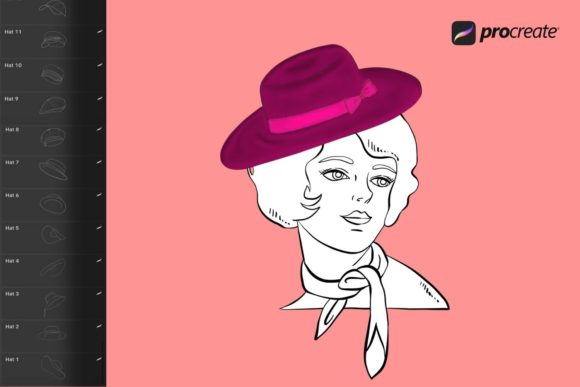
At their core, Hat Procreate Stamps are pre-rendered or vector-based brush tips saved in the proprietary .brushset format, exclusively compatible with the Procreate app on iPad. Unlike standard painting brushes that simulate media like oil, watercolor, or charcoal, stamp brushes function more like digital stickers or stencils that can be placed, resized, and manipulated instantly. The primary distinction of this specific collection is its focus: it provides a curated library of hat styles ranging from casual caps and beanies to formal fedoras and fantasy headgear.
The value proposition here centers on consistency and speed. When an artist is tasked with creating a series of characters for a game or a comic, maintaining consistent proportions and perspectives for accessories can be time-consuming. Drawing a complex baseball cap in perfect three-point perspective for every single character variant can disrupt creative flow. Hat Procreate Stamps mitigate this by offering ready-made forms that adhere to the logic of the software's transformation tools. Because they are delivered as a single .brushset file, the integration process is streamlined; once imported via the "Import" function in the Brush Studio, the entire library becomes immediately available within the user's interface.
Comparison: Manual Drawing vs. Stamp Assets
To make an informed decision about adopting these tools, one must weigh them against the traditional method of manual drawing. For purists, the argument for drawing every element from scratch remains strong. Manual drawing offers unlimited flexibility; if a character needs a hat with a very specific, non-standard brim curvature or an unusual material texture, a hand-drawn approach allows for total customization without being constrained by pre-existing shapes.
However, the trade-off is time and technical demand. Not every illustrator possesses the same level of confidence in rendering complex headwear structures, particularly in foreshortened views. This is where Hat Procreate Stamps provide a significant advantage. They act as a structural underdrawing or a final polish, depending on the user's intent. An artist might use a stamp to establish the correct perspective of a wide-brimmed hat, then lower the opacity and trace over it to add custom textures, effectively using the stamp as a learning aid or a scaffold. Conversely, for rapid prototyping or mood boarding, the stamps can be used at full opacity to visualize silhouettes instantly.
Another alternative involves using generic shape tools or importing PNG images manually. While feasible, this approach lacks the seamless integration of a native brush set. A PNG image sits on a layer as a flat object until manipulated, whereas a brush stamp interacts with the canvas dynamics, allowing for immediate adjustments in size and rotation without leaving the brush tool context. The .brushset format ensures that the stamps behave predictably within Procreate's engine, respecting pressure sensitivity settings if configured, although stamps generally rely more on tap-and-place mechanics than stroke pressure.
Technical Considerations and Workflow Integration
Adopting any new digital asset requires understanding its technical constraints. The most critical factor for Hat Procreate Stamps is platform exclusivity. These files are engineered specifically for the Procreate environment on the iPad, utilizing the Apple Pencil's input capabilities. They will not function in Photoshop, Clip Studio Paint, or other desktop-based illustration software. For artists who work across multiple platforms or require vector scalability for print production outside of the iPad ecosystem, this is a notable limitation. The raster-based nature of Procreate brushes means that while they can be scaled up reasonably well, extreme enlargement may eventually reveal pixelation, unlike true vector assets found in some desktop applications.
The installation process is straightforward but requires attention to the file delivery method. Upon acquisition, users receive a download link via email containing the .brushset file. The workflow dictates that the user must download this file to their iPad (typically saving it to the "Files" app) and then open Procreate to import it. Tapping the "+" icon in the Brush Library and selecting "Import" allows the user to navigate to the downloaded file. This simplicity is a strength, avoiding the complex folder navigation often required for desktop software plugins. However, it does require the user to have a basic understanding of the iPadOS file management system.
Once installed, the versatility of these stamps lies in their adaptability. Users are not locked into the default colors or textures provided in the preview images. Because they function as brushes, the color can be changed instantly using the Procreate color disk, and the opacity can be adjusted to blend the hat into the lighting conditions of the specific artwork. This flexibility allows a single stamp to serve multiple purposes—a dark fedora stamp can become a light straw hat simply by changing the hue and adding a texture overlay, maximizing the utility of the pack.
Ideal Use Cases and Limitations
Determining whether Hat Procreate Stamps are the right choice depends heavily on the specific project requirements. They are exceptionally well-suited for character designers working on large rosters, such as RPG character sheets or animation lineups, where consistency in accessory styling is paramount. Fashion illustrators who need to quickly iterate through different headwear options to complement outfit designs will also find significant value here. Additionally, beginners looking to understand the geometry of hats can use these stamps as reference layers to study how brims curve around the head and how crowns sit in space.
However, there are scenarios where these stamps may fall short. If the artistic style demands highly stylized, exaggerated, or abstract interpretations of headwear that deviate significantly from realistic proportions, pre-made stamps might feel restrictive. In such cases, the time spent modifying a stamp to fit a surreal style might equal the time required to draw it from scratch. Furthermore, for projects requiring absolute copyright ownership of every visual element created from the ground up, some artists prefer to avoid third-party assets entirely, even if the license permits commercial use, to ensure their portfolio demonstrates 100% original construction skills.
Making the Decision
Ultimately, the decision to integrate Hat Procreate Stamps into your toolkit comes down to a balance between efficiency and creative control. They represent a pragmatic solution for the modern digital artist who values time management without sacrificing visual quality. They are not a replacement for fundamental drawing skills but rather a force multiplier for those who already possess them. By handling the repetitive task of constructing complex hat geometries, these tools free up mental energy for more critical aspects of the illustration, such as lighting, color theory, and character expression.
For those operating strictly within the iPad and Procreate ecosystem, the seamless integration and ease of use make them a compelling option. The ability to instantly deploy a variety of styles, adjust their appearance to match any palette, and maintain perspective accuracy offers a tangible boost to productivity. However, artists who require cross-platform compatibility or who specialize in highly abstract styles should carefully evaluate if the specific forms provided align with their aesthetic goals before committing. As with any digital resource, the best approach is to view these stamps as one component of a broader, flexible workflow, utilizing them where they add value while retaining the freedom to draw manually when the situation demands it.